
Yesway & Allsup’s Rewards
PAR RetailAuto & Vehicles
4.81.17K Reviews
- Version
- 26.5.0
- Installs
- 100.00K
- Age Rating
- Everyone
Screenshots
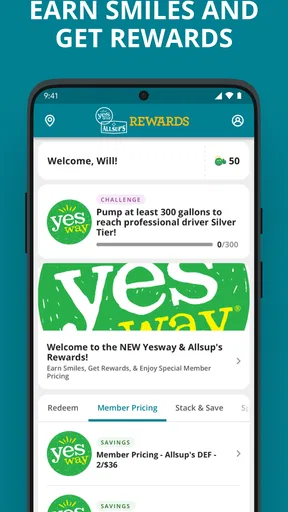
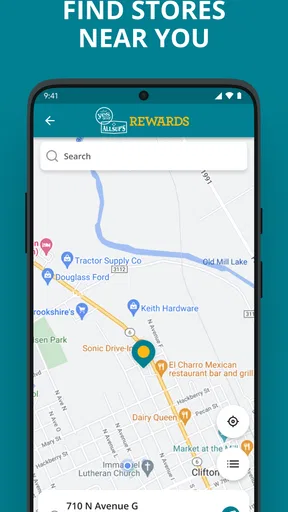
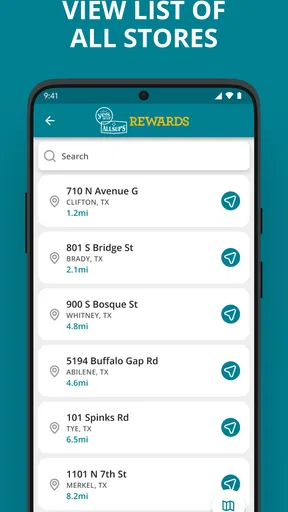
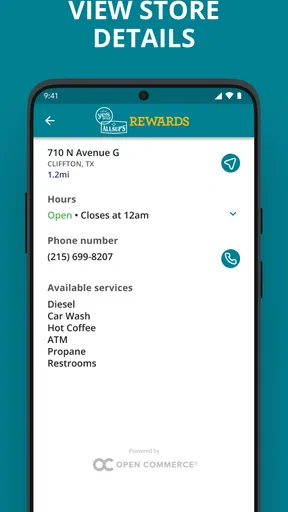
Our Review of Yesway & Allsup’s Rewards
 Analysis by Appyee
Saving money at fuel stops sounds simple until the process becomes another thing to manage while I am driving, carrying bags, or standing in a busy checkout line. Yesway & Allsup’s Rewards takes a focused approach to that problem: it puts the rewards experience for Yesway and Allsup’s stores on a phone, so I can handle the loyalty side of a visit without carrying a separate card. After spending time with it, I see it as a practical companion for regular customers rather than a general-purpose shopping app.
The app is free, rated for Everyone, and developed by PAR Retail. Its store presence is strong, with a 4.8 average from around 20 thousand ratings and more than 100 thousand installs. That level of adoption makes sense for an app tied to routine stops, although popularity alone does not make every interaction smooth. The real question is whether it helps during the short, slightly chaotic moments when I actually need it.
How the rewards experience feels in real life
I find the rewards experience easiest to judge as part of the whole stop, from checking the app before I arrive to deciding what to do if the screen stalls at checkout. That perspective also highlights a useful habit: make the rewards check before joining the line, so the decision stays quick and the purchase stays focused on what you actually planned to buy.
The best moments depend on a reliable connection
The most important thing to understand is that this is a connected rewards tool. The useful parts of the experience happen when the phone can communicate with the service: opening the account area, checking available rewards, presenting the relevant information at checkout, or reviewing what has happened after a purchase. I would not treat it like a paper coupon tucked in a wallet. Its value depends on being able to reach the current account information when I need it.
That matters more at a roadside store than it might in a quiet supermarket. A Yesway or Allsup’s visit can happen beside a highway, at a rural fuel stop, or in a building where mobile reception is inconsistent. If the app loads quickly, the process feels uncomplicated. If the connection hesitates, even a short reward interaction can become awkward because I am trying to hold up a line while waiting for a screen to appear.
My practical advice is to open the app before reaching the counter, especially if I am stopping somewhere unfamiliar. I can check the account while parked, rather than attempting to do everything with one hand while paying. This small habit changes the experience more than any clever feature would. It also keeps me from assuming that a reward is ready simply because I remember seeing it earlier.
The app is most useful when I treat connectivity as part of the checkout routine, not as an invisible guarantee. That is not a criticism unique to this service; it is the trade-off of keeping rewards tied to current account information instead of relying entirely on printed material. Still, it is an important distinction for anyone who regularly travels through weak-signal areas.
A realistic road-trip scenario
Imagine leaving work for a long drive and stopping at an Allsup’s location for fuel, a drink, and something quick to eat. I would not wait until I was at the register to launch the app. While parked, I would open it, let the account area settle, and look for whatever reward information is relevant to that visit. Then I could approach the counter with a clearer idea of what I want to use.
If the connection remains stable, this is exactly the kind of small convenience the app is designed to provide. I do not need to remember a printed offer or search through unrelated shopping apps. The experience stays close to the store visit. If the signal drops as I pull into the station, however, the advantage becomes less certain. I may need to wait, continue without using the reward, or ask the cashier what alternatives are available.
This is why I would recommend it more strongly to people who visit these stores often than to someone making a one-time stop. Frequent use gives the setup and occasional loading delay a purpose. For an occasional traveler, a reward app can feel like extra preparation for a benefit that may not be available at the exact moment it is needed.
Using it while moving is the wrong workflow
Because the app belongs to the Auto & Vehicles category, it naturally fits the rhythm of driving-related errands, but that does not mean it should be used while driving. I would set everything up before moving, and I would only interact with it after parking. This is especially important when the phone is also being used for navigation or hands-free communication.
The mobile context creates another challenge: bright sunlight, gloves, a crowded cup holder, or a phone mounted at an awkward angle can all make a quick screen interaction harder. A rewards app cannot remove those physical inconveniences. The safest and least frustrating approach is to make the app part of the stop, not part of the journey between stops.
For passengers, the situation is easier. A passenger can prepare the account while the vehicle is parked or while someone else handles the route. Even then, I would avoid trying to solve a connection problem on a moving highway. The potential saving is not worth distracted use or a rushed handoff at the register.
Where the app fits better than the usual alternatives
The usual alternative is a physical loyalty card, a wallet full of receipts, or simply paying without tracking rewards. A dedicated phone app is cleaner when I already carry my phone and want one place for the Yesway and Allsup’s rewards relationship. It also avoids the easy mistake of leaving a card at home or discovering that an old paper offer is no longer useful.
On the other hand, a physical method has one major advantage: it does not depend on a live screen at the counter. If I am traveling through areas with unreliable reception, the simpler option may be less stressful. A general wallet app can also be more convenient for someone who manages many retailers, but it may not provide the same direct connection to these specific stores.
I would not choose this app as a replacement for every shopping or fuel-payment tool. Its narrow focus is a strength for Yesway and Allsup’s customers, but a weakness for people who want one universal rewards hub. The right choice depends on how often these stores are part of my routine.
What happens when loading fails
Connectivity failures are the main situation I would plan around. A screen that takes too long to load can be caused by poor reception, a congested store network, or a temporary service problem, and the app may not make those causes obvious in the moment. From a user’s point of view, the result is the same: uncertainty just when the cashier is ready to finish the transaction.
I would handle this with a simple recovery sequence. First, I would stop tapping repeatedly, because repeated attempts rarely make a slow connection faster. I would check that the phone still has a usable connection, move to a position with better reception if that is practical, and reopen the relevant area only after giving it a moment. If the reward still does not appear, I would complete the purchase rather than hold up the line.
That last step is worth emphasizing. A rewards app should save effort, not turn every checkout into a technical support session. I would keep the app updated and make sure the phone is running a supported system, but I would also accept that no connected service is perfect. The current version is 26.5.0, and the minimum operating system is Android 9, so compatibility is reasonable for many phones, though users of older devices should check their system before relying on it.
Recovery is easier when I prepare before arriving. Opening the app in the parking area gives me time to notice a problem without a line behind me. It also lets me decide whether the visit is worth proceeding with the app or whether I should simply pay and move on. That is a more realistic strategy than expecting flawless access at every fuel stop.
Keeping mobile data use sensible
I would not describe a rewards app as something that should consume a large amount of mobile data during normal use, but every connected refresh still relies on the phone’s network. The sensible approach is to use it deliberately rather than repeatedly refreshing account screens throughout a trip. There is no benefit in opening it at every mile marker when I only need it at the store.
On a longer drive, I would wait until I am safely parked, connect through a dependable network when available, and avoid leaving the app open in the background unnecessarily. I would also be cautious about assuming that a screen viewed earlier will always reflect the latest account state. If the app needs current information, a new connection may be required, and that is precisely when a weak signal can become noticeable.
People with limited data plans may prefer to prepare before leaving home or before entering a low-coverage area, while still remembering that preparation is not the same as guaranteed offline access. I would not rely on a screenshot as a substitute for the live rewards experience unless the store explicitly accepts that method. A saved image may be outdated, incomplete, or impossible for staff to validate.
This is one of the app’s less visible trade-offs. The phone makes rewards easier to carry, but it also makes the process dependent on battery life, reception, and a functioning device. A physical card is less flexible, yet it remains available when the phone is dead or the network is unavailable. For frequent users, the convenience usually outweighs that risk; for emergency travelers, it may not.
Who will get the most from it
I think the strongest audience is someone who regularly visits Yesway or Allsup’s and wants rewards access without maintaining a separate physical card. Commuters, delivery drivers, road-trippers who use the same routes, and families that make frequent convenience-store stops can all benefit from having the account close at hand.
It is also a good fit for people who prefer checking their rewards before walking into a store. That habit makes the app feel more intentional: I can decide whether to use an offer, whether to make a planned stop, and whether the expected benefit justifies a small detour. The app becomes part of budgeting for routine fuel and convenience purchases rather than an afterthought at the register.
I would be less enthusiastic about recommending it to someone who rarely visits either brand, has an older unsupported phone, or often shops in places with unreliable mobile service. Someone who dislikes creating accounts or managing another app may also find the benefit too narrow. In those cases, paying normally or using a simpler physical method may be more comfortable.
There is another subtle trade-off for shared households. If several people use the same rewards account, the phone holder may not be the person making every purchase. That can make coordination important: the person going into the store needs access at the right time. A dedicated app is convenient, but convenience depends on the account and device being available when the family member, passenger, or coworker stops to pay.
What I would do before depending on it
My setup would be straightforward. I would install the app while connected to a reliable network, sign in before the first urgent stop, and open it once at home so I know where the relevant account and reward information appears. I would then test the routine during a normal visit, when there is no long journey or time pressure attached to the outcome.
Before a road trip, I would check the app while parked and make sure the phone has enough battery for the whole journey. I would not assume that a rural location will provide the same response as a city store. If the route includes stretches with weak reception, I would carry a backup payment method and avoid planning the trip around a reward that I cannot confidently access.
I would also keep expectations realistic. A rewards app can organize access to benefits, but it does not automatically make every purchase cheaper or eliminate the need to read what is available at the time of purchase. The useful behavior is to check, decide, and then buy what I already intended to buy. Chasing a reward by making unnecessary purchases defeats the point of saving.
A balanced look at the everyday trade-offs
The app’s strongest quality is focus. It is not trying to be a map, a full fuel-management system, or a universal shopping wallet. For the person who visits Yesway and Allsup’s, that narrow purpose can make the experience easier to understand than a broad loyalty platform filled with unrelated brands and notifications.
Its main weakness is equally clear: the most useful moments are tied to a working phone and connection. A slow load can be more disruptive here than in an app I browse casually at home, because the interaction often happens during a short transaction. The app also asks me to remember one more digital routine, even though the whole point is to make rewards easier.
The rating of 4.8 from around 20 thousand ratings suggests that many users find the overall experience worthwhile, while the roughly 1.2 thousand written reviews show that people have taken the time to describe their experiences in more detail. I read those figures as evidence of a well-received service, not a promise that every roadside checkout will be effortless. My own recommendation is similarly conditional: it is useful when the stores are already part of my life and I prepare for the connected nature of the tool.
My connectivity verdict
Yesway & Allsup’s Rewards is a sensible free app for regular customers who want rewards access on their phone and are comfortable planning around mobile connectivity. I would install it if Yesway or Allsup’s were common stops on my commute or travel route. The combination of a focused purpose, an Everyone age rating, and broad availability makes it easy to try without much commitment.
I would not call it essential for every driver. Someone who visits these stores only once, travels mostly through weak-signal areas, or prefers a completely offline payment routine may be better served by a physical alternative or by skipping the rewards layer. For everyone else, the winning workflow is simple: prepare while parked, check the current information before reaching the counter, keep a backup payment option, and never use the phone while driving.
After using it, my view is that the app succeeds when I treat it as a connected stop-management tool rather than a magic discount button. It can make a familiar Yesway or Allsup’s visit more organized, but its convenience is strongest when I respect the limits imposed by reception, battery, and timing. That is a fair trade for a focused rewards app, and for frequent customers, it is likely a worthwhile one.
Verdict
Strengths of Yesway & Allsup’s Rewards
- Earn points on eligible purchases at Yesway and Allsup’s locations.
- Redeem rewards for discounts on snacks, drinks, fuel, and other items.
- Store locator helps find nearby participating Yesway and Allsup’s stores.
- Digital offers can provide extra savings beyond standard rewards.
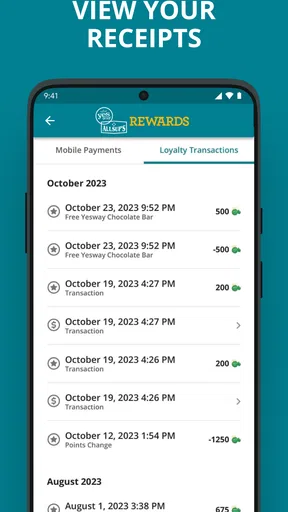
- Convenient access to account activity and available rewards in one app.
Limitations of Yesway & Allsup’s Rewards
- Rewards and offers may vary by location and participating store.
- Points may expire or be subject to program terms and restrictions.
- Requires an account and personal information to use the rewards program.
- Some promotions may require activating offers before making a purchase.
- App usefulness is limited in areas without nearby Yesway or Allsup’s stores.
Other Releases by PAR Retail
View All
Marathon Rewards
Auto & Vehicles4.8

Royal Farms Rewards
Food & Drink4.8

Jacksons Let's Go Rewards
Food & Drink4.8

ARCO Rewards
Auto & Vehicles4.8
Similar Picks in This Category
View All
Android Auto
Google LLC4.1

maxim — order a taxi & food
PT. SITO4.7

Штрафы ГИБДД: проверка с фото
Pays LLC – Штрафы ГИБДД4.7

Номерограм – проверка авто
Авто Ассист4.8

Дром Авто
Дром4.9

Frequently Asked Questions
What is the Yesway & Allsup’s Rewards app used for?
The Yesway & Allsup’s Rewards app is designed for customers who shop at participating Yesway and Allsup’s convenience stores. It can help users find nearby locations, view available promotions, earn rewards from eligible purchases, and access digital offers. The exact features may vary by location, account status, and current promotional campaigns, so checking the in-app terms is recommended.
How do I earn and redeem rewards in the Yesway & Allsup’s Rewards app?
After creating or signing into an account, you generally earn rewards by identifying yourself through the app or using the account details connected to an eligible purchase. Rewards, points, discounts, or promotional benefits may depend on the items purchased and the offer rules. Before redeeming anything, review expiration dates, participating stores, spending requirements, and any product exclusions shown in the app.
Is the Yesway & Allsup’s Rewards app free to download and use?
The app is typically free to download and use, although standard mobile data charges may apply when using cellular internet. You do not usually need to pay a subscription simply to create a rewards account or browse store information. However, purchases made at Yesway or Allsup’s locations still cost money, and certain promotions may require qualifying transactions or specific payment conditions.
Does the app work at every Yesway and Allsup’s store?
Most core rewards features are intended for participating Yesway and Allsup’s locations, but not every store or promotion necessarily offers identical benefits. Store availability, fuel offers, product discounts, and reward rules can differ by region. The location finder and offer details are useful for confirming whether a nearby store participates before making a trip or expecting a particular reward.
What personal information does the Yesway & Allsup’s Rewards app require?
To use personalized rewards features, the app may request information such as your name, email address, phone number, account credentials, location, and purchase-related activity. Some permissions are optional, while others may support account security, store discovery, or offer delivery. Before registering, review the app’s privacy policy and device permissions so you understand how your information may be collected and used.
